 Skip to content

Is your trading account actually secure?
Most traders believe their account is safe as long as they don’t share their login. But if you are using copy trading services, connecting to Myfxbook, or auditing a signal provider, you must share access. The danger lies in which key you hand over.
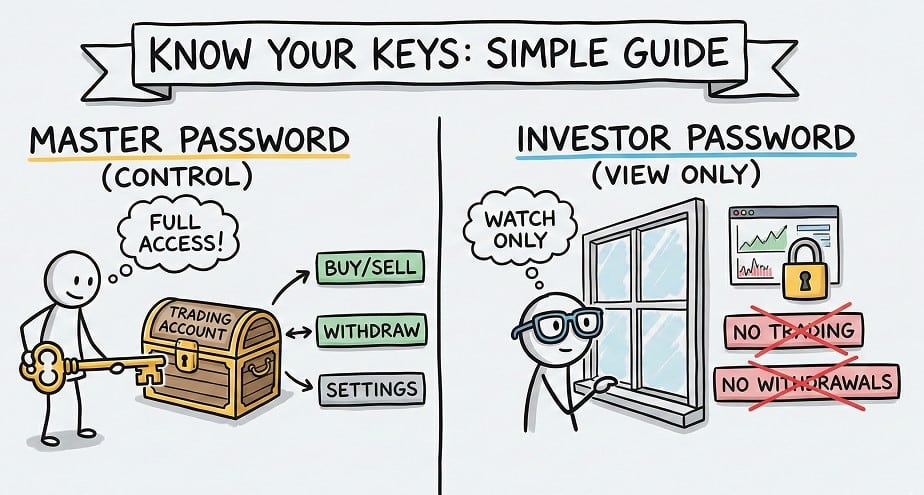
Give the wrong person your Master Password, and they can drain your account in minutes. Give them your Investor Password, and they can only watch.
This guide explains the critical differences, how to set up “Read-Only” access on MT4/MT5 (even on mobile), and why modern platforms like cTrader are ditching this system entirely.
What is the Difference Between Master and Investor Passwords?
At its core, the difference is about permissions. Think of your trading account like a building:
- The Master Password is the Owner’s Key. It opens every door, including the vault.
- The Investor Password is the Auditor’s Badge. It lets visitors walk around and look at the furniture, but they cannot touch, move, or remove anything.
The Permission Matrix
| Feature | Master Password | Investor Password |
| View Live Charts | Yes | Yes |
| View Account History | Yes | Yes |
| Execute Trades | Yes | NO |
| Modify Stop Loss/TP | Yes | NO |
| Withdraw Funds | Yes | NO |
| Link to Myfxbook | Yes | Yes |
Key Takeaway: If you ever hire a “mentor” or connect to a trade copier, ONLY use the Investor Password. If they claim they need the Master Password to “install a bot,” they are likely attempting a scam.
Platform Specifics: How Access Varies by Interface
Not all platforms handle security the same way. The “Investor Password” is a legacy concept from MetaTrader. Modern platforms have evolved.
MetaTrader 4 & 5 (The Standard)
MT4 and MT5 use a rigid “Two-Password” system stored directly on the broker’s server. You have one login (Account Number) and two potential passwords.
- Login + Master Pass: Full Admin Access.
- Login + Investor Pass: Read-Only Mode.
cTrader (The Modern Approach)
cTrader does NOT use Investor Passwords.
Instead, it uses cTID (cTrader ID) and “Shared Access.”
- How it works: You do not send a password. You click a “Share Access” button inside the platform and enter the recipient’s email or generate a specific link.
- The Benefit: You can revoke access instantly without changing your own password. In MT4, if you want to kick an observer out, you have to change the password for everyone.
How to Change Your Investor Password (Desktop & Mobile)
A common frustration for traders is trying to generate an investor password on their phone and failing. Here is the technical reality: Many broker apps allow you to change an existing investor password, but not create a new one.
1. The Desktop Method (MT4 & MT5)
This is the most reliable method.
- Open your terminal and press Ctrl+O (or go to Tools > Options).
- Click the Server tab.
- Click the Change button next to your password field.
- Crucial Step: You must enter your current Master Password first to authorize the change.
- Select “Change investor (read-only) password.”
- Enter your new password and click OK.
2. The Mobile Method (Android & iOS)
Note: Options vary by broker implementation.
- Go to Settings (iOS) or Manage Accounts (Android).
- Tap the three dots next to your account.
- Select Change Password.
- Choose “Change Investor Password”.
- Troubleshooting: If you do not see this option, you must log in on a Desktop PC to set it up for the first time.
Top Use Cases: Why You Need Read-Only Access
Why would you ever want someone snooping on your trades? In the professional Forex world, transparency is currency.
1. Verifying Results (Myfxbook)
To prove your trading history is real, you link your account to audit sites like Myfxbook or MQL5.
- The Process: You provide Myfxbook with your Investor Password.
- The Verification: Their servers ping your broker using this password to download your history. Because they cannot execute trades, your funds remain safe during the audit.
2. Copy Trading & Signals
When you subscribe to a signal service, the software often needs to “read” the signal provider’s account to replicate the trades on yours. It uses the read-only access to detect when a trade is opened so it can copy it immediately.
3. Tax & Accounting
You can give your accountant the Investor Password. They can export your trading history to Excel for tax reporting without the risk of them accidentally closing a position while fumbling with the mouse.
Security Warning: The “Telegram Mentor” Scam
One of the most common scams in 2024 involves “Account Management.”
- The Pitch: A stranger on Telegram claims they have a winning bot and offers to trade for you.
- The Trap: They ask for your Master Password to “connect the bot.”
- The Reality: Once they have the Master Password, they can open high-leverage positions to churn commissions (burning your account) or, in some cases, hold the account hostage.
The Golden Rule: Never, under any circumstances, share your Master Password. If a legitimate fund manager wants to trade for you, they will use a MAM/PAMM system or Copy Trading link—neither requires them to possess your private login keys.
FAQ: Common Security Questions
What is the main difference between a master password and an investor password?
The Master Password grants full trading and withdrawal rights, while the Investor Password offers read-only access. You can view charts and history with an Investor Password, but you cannot execute trades.
Is it safe to share my investor password?
Yes, it is generally safe. Since the access is read-only, third parties cannot steal funds or open positions. However, be aware they can see your balance and strategy, which is a privacy consideration.
Can I trade using an investor password?
No, the “New Order” button will be disabled. If you log in and find you cannot place trades, you likely logged in with the Investor Password by mistake.
How do I find my investor password on MT4?
You usually cannot “find” it; you must reset it. Most brokers do not email this by default. Go to Tools > Options > Server > Change in your desktop terminal to set a new one.
Does cTrader have an investor password?
No, cTrader uses “Shared Access.” Instead of a password, you grant permission via cID (cTrader ID). This allows you to revoke access specifically for one person without changing your main credentials.
