 Skip to content

Trading Forex manually is exhausting. You stare at charts for hours, fight the urge to “revenge trade,” and often end the day with less money than you started with.
If you are tired of the emotional rollercoaster but still want exposure to the markets, MQL5 Signal Service is likely the solution you have been looking for.
But here is the reality: simply clicking “Subscribe” isn’t enough. Without the right setup, you can lose money even if the trader you are copying is winning.
This guide covers exactly how to set up, analyze, and profit from MQL5 signals while avoiding the technical pitfalls that trap beginners.
What is MQL5 Signal Service? (And Why Smart Investors Switch to It)
The MQL5 Signal Service is a native copy-trading feature built directly into the MetaTrader 5 (MT5) platform. Unlike “social trading” apps that often gamify investing, MQL5 connects your trading terminal directly to a professional trader’s account.
Here is how it works:
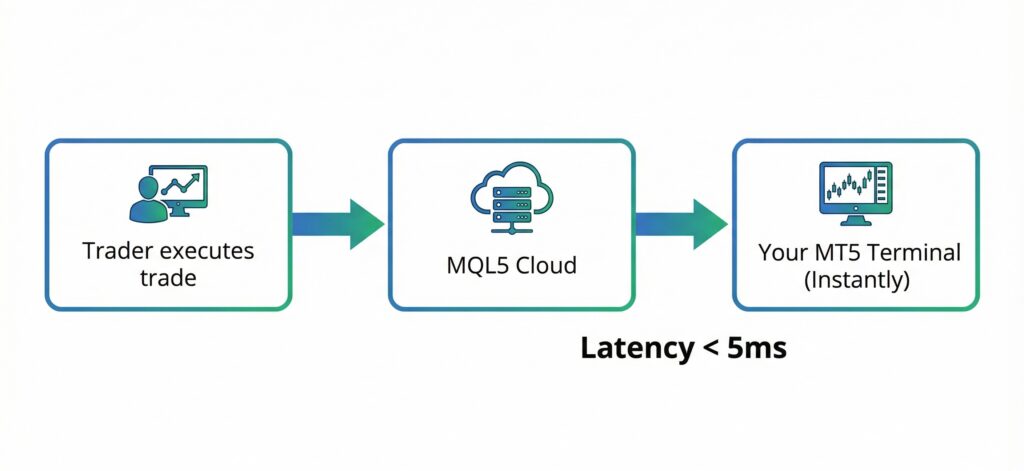
- A Signal Provider (a trader) executes a trade on their account.
- The MQL5 Cloud Network detects the trade instantly.
- The trade is replicated in your account in milliseconds.
You maintain full control of your funds. The provider never touches your money; they simply send the data that triggers the trade.
Why Choose MQL5 Over Others?
- Transparency: Providers must pass a one-month monitoring period before their signal is public.
- Speed: Because it is native to MetaTrader, execution is faster than third-party copiers.
- Fixed Costs: You typically pay a flat monthly fee (e.g., $30) rather than sharing a percentage of your profits.
How to Set Up MQL5 Signals the Right Way (Step-by-Step)
Most “signal failures” aren’t due to bad trading. They are due to bad setups. Follow these three steps to ensure your account mirrors the provider perfectly.
Step 1: Choosing a Compatible Broker
You need a broker with low spreads and fast execution. If your provider uses a “Raw Spread” account (where spreads are near 0), and you use a “Standard” account (where spreads are 1.5 pips), you will start every trade at a disadvantage.
Pro Tip: Always try to use the same broker—or at least a broker in the same server location—as your signal provider to minimize slippage.
Step 2: Renting a VPS (Crucial for 24/7 Uptime)
This is non-negotiable. For MQL5 signals to work, your MetaTrader terminal must be online 24/7.
- If your internet cuts out, the trade won’t close.
- If your computer sleeps, the trade won’t open.
To fix this, use a Virtual Private Server (VPS). This is a cloud computer that runs your MT5 platform continuously. MQL5 offers a built-in VPS service you can rent directly from the platform for about $15/month.
Step 3: Syncing the Signal to Your Terminal
Once you have an MQL5 community account and a funded broker account:
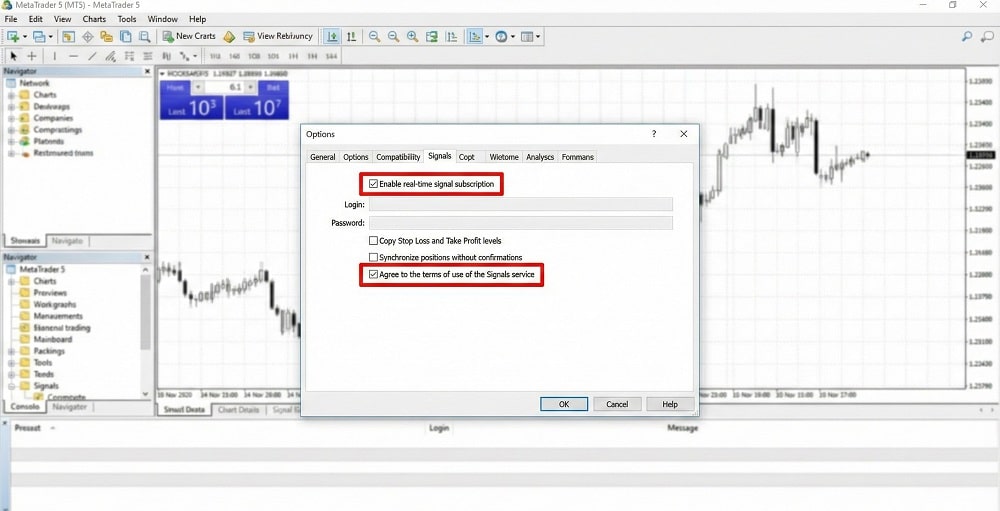
- Open MT5 and go to Tools > Options > Community. Login with your MQL5 credentials.
- Go to the Signals tab.
- Subscribe to your chosen signal.
- Check the box “Enable real-time signal subscription.”
- Set your risk parameters (e.g., “Use no more than 95% of deposit”).
How to Analyze a Signal: 5 Metrics That Lie (And 3 That Don’t)
Do not be seduced by a signal showing “5,000% Growth.” High growth in a short time usually indicates a dangerous strategy like Martingale (doubling down on losing trades), which eventually leads to a blown account.
Look for these Green Flags instead:
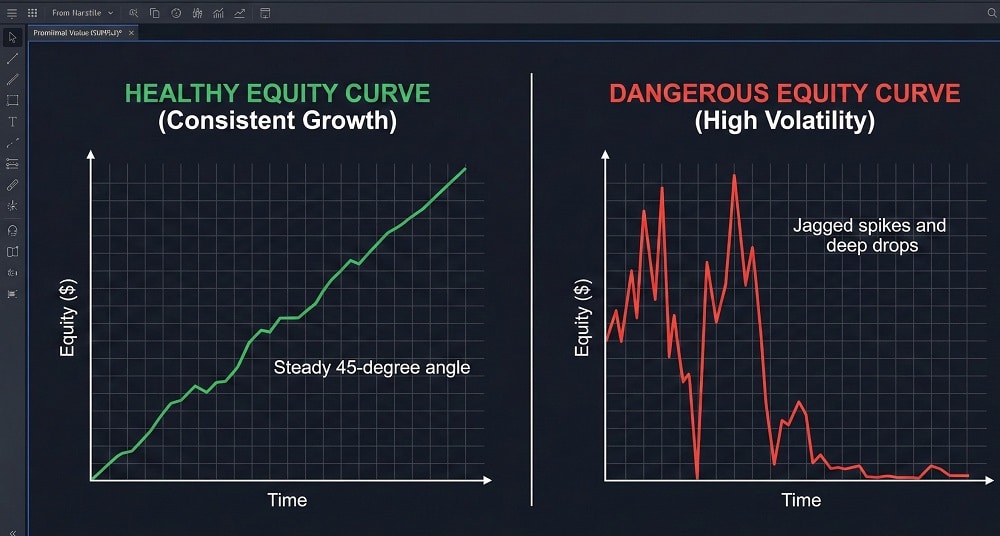
- Drawdown < 30%: Maximum Drawdown measures the largest drop the account has ever suffered. If a provider has a 60% drawdown, they are risking too much.
- Steady Equity Curve: You want a chart that looks like a staircase going up, not a heart monitor spiking up and down.
- Reliability Rating: MQL5 assigns a reliability score. Stick to high-reliability signals to ensure the provider isn’t taking reckless risks.
MQL5 Signals vs. PAMM Accounts: Which is Best for You?
Investors often confuse Signal Services with PAMM (Percentage Allocation Management Module) accounts. Here is the breakdown:
| Feature | MQL5 Signal Service | PAMM / MAM Account |
| Control of Funds | High. Money stays in your account. You can stop copying anytime. | Low. Funds are pooled into a master account managed by the trader. |
| Cost Structure | Fixed Fee. (e.g., $30/month) regardless of profit size. | Performance Fee. (e.g., 30% of profits). |
| Lot Sizing | You can adjust the ratio (risk) of the copy. | The manager controls the risk/lot size. |
| Best For | Traders who want transparency and control. | Investors who want a completely hands-off experience. |
Troubleshooting: Why “Signal Disabled” & Other Errors Happen
If you see an error log in your “Journal” tab, don’t panic. Here are the common fixes:
- “Signal – disabled”: You likely changed your account password or changed the broker server. You must re-sync the signal in the Options menu.
- “Different betting settings”: This happens if you try to copy a signal on a specialized account (like a Cent account) that has different symbol names (e.g., EURUSD.c instead of EURUSD). You may need to manually map the symbols.
- High Slippage: If your entry price is significantly worse than the provider’s, your Ping (latency) is too high. Switch to a VPS located closer to the provider’s broker server.
Professional Insight: Achieving Consistent Returns
Copy trading is a powerful tool, but it requires the right partner.
At SarowarJahan.com, I focus on sustainable, long-term growth rather than high-risk gambling. As a professional Forex trader and fund manager, my strategies are built on strict risk management principles designed to protect capital first and grow it second.
Whether you are looking for reliable MQL5 signals to copy or personalized fund management solutions, transparency is key. You can verify my trading history, view active signals, and check my reliability statistics directly on my official MQL5 Profile.
I invite you to review these track records and see how we can align with your financial goals.
Frequently Asked Questions (FAQ)
Is MQL5 signal service free to use?
No, usually. While there are free signals available for demo accounts, high-quality signals on real accounts typically charge a monthly subscription fee between $30 and $50.
Explanation: Free signals are often untested or used by beginners. Paying a subscription fee filters for serious providers who have a financial incentive to maintain high performance.
Do I need my computer on for MQL5 signals?
Yes, absolutely. Your MetaTrader terminal must be running to receive and execute trades.
Explanation: If your computer shuts down, the connection is lost. This is why renting a VPS (Virtual Private Server) is highly recommended. It keeps your platform running in the cloud 24/7, ensuring you never miss a trade entry or exit.
Can I copy MQL5 signals to a different broker?
Yes, but with caution. You can subscribe to a signal regardless of which broker you use.
Explanation: However, copying between different brokers introduces slippage (price differences) and latency (delays). For the best results, use the same broker as your signal provider to ensure your entry and exit prices match theirs as closely as possible.
How do I choose the best MQL5 signal provider?
Look at Drawdown, not just Profit. A good provider balances risk and reward.
Explanation: Avoid providers with >30% drawdown or “martingale” strategies. Check their “Subscribers” count (social proof) and ensure their trading history spans at least 6–12 months. Always verify the provider’s full profile—for example, you can analyze my performance metrics here: Sarowar Jahan MQL5 Profile.
