


You’ve finally built a trading strategy that works. Your numbers are up, and you’re ready to show your results to potential investors, a prop firm, or a tracking service like Myfxbook.
But there is a problem. To verify your results, you need to share access to your account.
Handing over your login credentials feels like handing over the keys to your bank vault. What if they place a rogue trade? What if they withdraw your funds? This is a legitimate fear that stops many traders from moving to the professional level.
The solution is the Investor Password.
This specific feature within MetaTrader 4 (MT4) and MetaTrader 5 (MT5) allows you to share your success without risking a single cent of your capital. This guide explains exactly how it works, how to set it up, and how professionals use it to audit trading results.
What Exactly is an Investor Password?
An Investor Password is a specialized, read-only login credential for the MetaTrader platform.
When someone logs into your account using this password, they enter “Guest Mode.” They can see everything happening in real-time, but they cannot touch anything.
With an Investor Password, a user can:
- View open and closed trades.
- Analyze transaction history.
- Look at charts and apply technical indicators.
They cannot:
- Open, close, or modify orders.
- Request withdrawals.
- Change account settings or passwords.
It is the standard industry method for proving a track record. It replaces screenshots (which can be faked) with live, verifiable access.
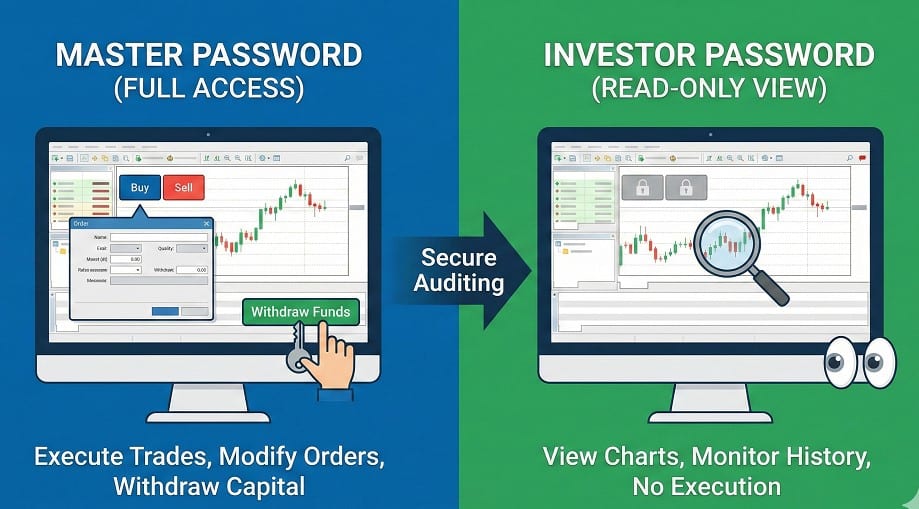
Master Password vs. Investor Password: Key Differences
Understanding the distinction between these two is critical for your account security. The Master Password is for you; the Investor Password is for everyone else.
Here is the breakdown of permissions:
| Feature | Master Password (Admin) | Investor Password (Read-Only) |
| View Charts & Price | Allowed | Allowed |
| View Trade History | Allowed | Allowed |
| Open/Close Trades | Allowed | Blocked |
| Modify Stop Loss/TP | Allowed | Blocked |
| Request Withdrawals | Allowed | Blocked |
| Change Passwords | Allowed | Blocked |
Critical Safety Rule: Never send your Master Password to anyone claiming to be an “account manager” or “auditor” unless you have a signed legal Power of Attorney (LPOA) with a regulated broker. For everyone else, use the Investor Password.
Why You Need an Investor Password (3 Critical Use Cases)
If you are just trading for yourself, you might never use this. But if you plan to make a career out of Forex, you will need it for three specific reasons.
1. Verifying Results on Myfxbook
Third-party auditing sites like Myfxbook or FXBlue require you to prove your data is real. They do this by logging into your account using your Investor Password. This allows them to download your history and generate verified graphs without putting your funds at risk.
2. Passing Prop Firm Challenges
Firms like FTMO or MyForexFunds use automated systems to monitor your trading during an evaluation. They require your Investor Password to track your equity curve and ensure you aren’t violating drawdown rules.
3. Selling Signals or Strategy
Trust is the currency of the signal business. Smart clients will not buy based on a screenshot. They want to see the live account. By providing read-only access, you prove your competence.
At Sarowar Jahan – Professional Forex Trader, transparency is a core value. Whether it is for fund management or signal services, verified track records—accessible via investor passwords or auditing links—are the standard for building trust with clients.
How to Set or Change Your Investor Password (Step-by-Step)
Setting this up takes less than a minute. You can do this regardless of whether you are on a demo or a live account.
On MT4/MT5 Desktop (PC/Mac)
- Open your MetaTrader terminal.
- Click on Tools in the top menu, then select Options (or press
Ctrl+O). - Click the Server tab.
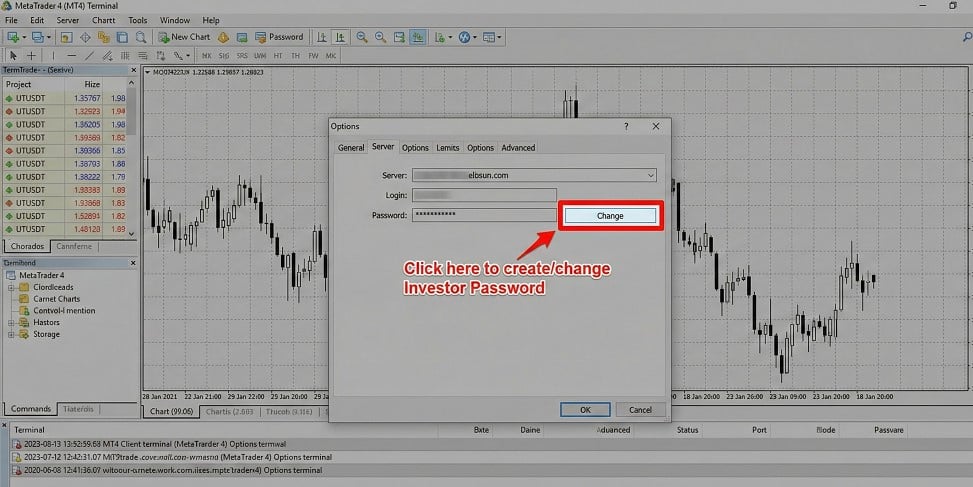
- Click the Change button next to the password field.
- Crucial Step: In the “Current password” box, enter your Master Password.
- Select “Change investor (read-only) password”.
- Enter your new investor password twice and click OK.
On Mobile (Android/iOS)
Mobile functionality is often limited. While some broker-specific versions of the MT4/MT5 app allow password changes under “Manage Accounts,” it is often unreliable.
Pro Tip: If you only have mobile access, log in to your broker’s client portal (website). Most brokers allow you to reset your trading passwords directly from their dashboard without opening the MT4 app.
Troubleshooting: Why Is the “Change Password” Button Greyed Out?
This is the most common issue traders face. You go to the options menu, but the “Change” button cannot be clicked.
The Cause: You are currently logged in with the Investor Password.
The Fix: You must have administrative rights to change account settings. Log out and log back in using your Master Password. Once you have admin access, the button will become active again.
Security Best Practices: The “Safe Sharing” Checklist
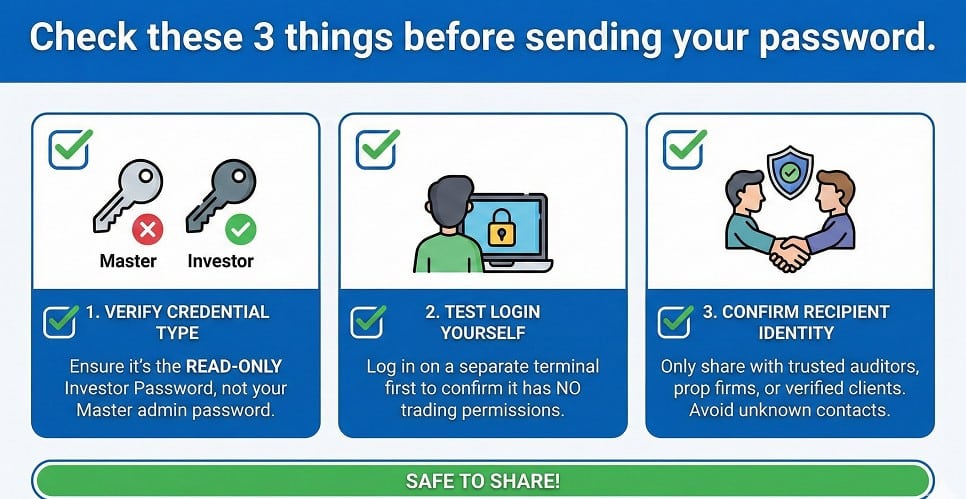
Before you send that password via email or Telegram, run through this quick safety check.
- Double Check the Credentials: Test the password yourself first. Log in using a different MT4 instance to confirm it is definitely Read-Only.
- Hide The Terminal: If you are sharing your screen (e.g., on Zoom/Skype) rather than the password, hide your “Terminal” window so your account number and balance aren’t flashed to the public unintentionally.
- Know Who You Are Dealing With: Scammers often ask for the “password” without specifying which one. If they get your Master Password, they can open max-lot trades to blow your account or hedge against their own positions. Always clarify: “I am sending the Investor (Read-Only) password.”
FAQ: Common Questions About Investor Passwords
How do I find my investor password on MT4 if I lost it?
You cannot view an existing password; you must reset it.
For security reasons, MT4 does not display saved passwords. Go to Tools > Options > Server > Change, enter your Master Password, and create a new Investor Password.
Can someone steal my money with an investor password?
No, it is technically impossible.
The Investor Password restricts the terminal to “Guest Mode.” The buttons for “New Order,” “Close Order,” and “Withdraw” are disabled by the server. The user can look, but they cannot touch.
What is the difference between the master and investor password?
The Master Password is for trading; the Investor Password is for auditing.
The Master Password gives full control (trading, withdrawals, settings). The Investor Password gives limited control (viewing charts and history only).
Can I trade using the investor password?
No, you cannot execute trades.
If you log in and find you cannot place trades (the buttons are greyed out), you have likely logged in with your Investor Password by mistake. Re-login with your Master credential to fix this.
Ready to take your trading to the professional level?
Transparency is just the first step. For professional signal services, fund management, and expert market analysis, visit Sarowar Jahan to see how disciplined trading yields consistent results.